Square fees in 2026: what Square charges per payment (table and calculator)

Disclosure: some links on this page may be affiliate links. If you sign up through them, we earn a commission at no extra cost to you. This site belongs to NEXO Digital, an agency that sells websites, chat and receptionist services to Hispanic businesses. Details.
The short answer
- On the free plan (Square Free, $0 a month), Square charges 2.6% + 15¢ per in-person payment and 3.3% + 30¢ per online or invoice payment by card.
- If you key in the card or use a card on file: 3.5% + 15¢.
- If your customer pays an invoice from their bank account (ACH): 1%, $1 minimum.
- Moving your money to your bank by the next business day is free. If you want it right away, it costs 1.95%.
- Chargebacks (when a customer disputes with their bank) have no fee.
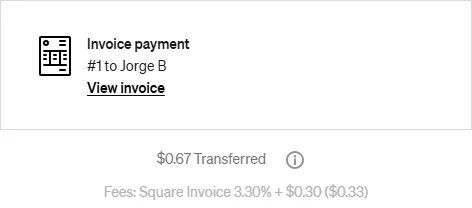
- We checked it with two real $1 payments: on an invoice, Square kept 33¢; in person with Tap to Pay, 18¢.
Square's fees, plan by plan
Square has three plans with a published price. The paid plans are billed per location.
| How you get paid | Square Free ($0) | Square Plus ($49/month) | Square Premium ($149/month) |
|---|---|---|---|
| In person (tap, dip, or swipe) | 2.6% + 15¢ | 2.5% + 15¢ | 2.4% + 15¢ |
| Online and invoices paid by card | 3.3% + 30¢ | 2.9% + 30¢ | 2.9% + 30¢ |
| Keyed-in or card on file | 3.5% + 15¢ | 3.5% + 15¢ | 3.5% + 15¢ |
| Invoice paid by ACH (bank account) | 1%, $1 minimum | 1%, $1 minimum, $10 cap | 1%, $1 minimum, $10 cap |
| Afterpay (customer pays in installments) | 6% + 30¢ | 6% + 30¢ | 6% + 30¢ |
| Cash and checks recorded in Square | Free | Free | Free |
See how much you keep
Examples on the free plan
| Payment | In person | Online or invoice | Keyed-in | Invoice by ACH |
|---|---|---|---|---|
| $20 | 67¢ | 96¢ | 85¢ | $1.00 |
| $50 | $1.45 | $1.95 | $1.90 | $1.00 |
| $100 | $2.75 | $3.60 | $3.65 | $1.00 |
| $500 | $13.15 | $16.80 | $17.65 | $5.00 |
| $1,000 | $26.15 | $33.30 | $35.15 | $10.00 |
On big invoiced jobs, ACH saves you the most: on a $1,000 invoice you pay $10 instead of $33.30. On small payments, an in-person card payment works best.
Our real payments
On November 14, 2026, we sent a $1.00 invoice from NEXO Digital's Square account and paid it with a Visa card. Square charged exactly what its table says for the free plan:
On November 19, we took another $1.00 payment, this time in person with Tap to Pay on a phone. Square charged the free plan's in-person rate:
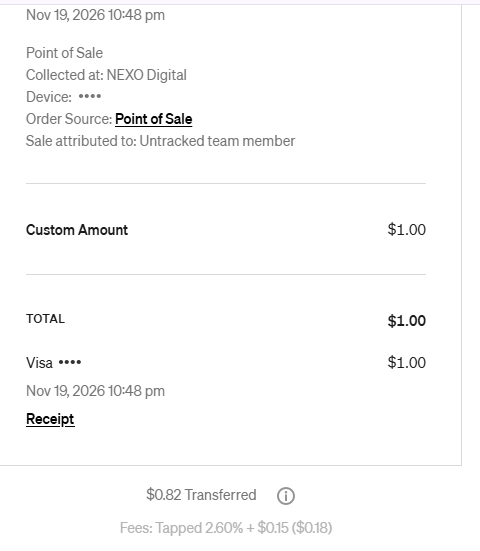
Tip: for small payments, take them in person. For the same dollar, the invoice cost us 33¢ and the in-person payment 18¢: the fixed part is 15¢ instead of 30¢.
What about taking payments on your phone (Tap to Pay)?
With Tap to Pay, your phone accepts cards with no reader and no hardware cost. On the free plan it costs 2.6% + 15¢ per payment, the same as an in-person payment with a reader.
How to turn it on and which phones work: see our guide to card readers for small businesses.
What it costs to move money to your bank
- Next business day: free. If the payment comes in before 5 PM Pacific (7 PM in Texas), it reaches your bank the next business day. If it comes in later, by the second business day.
- Instant or same-day transfer: 1.95% of the amount. On $500, that is $9.75. Instant transfers need a $25 minimum balance, and new accounts start with a limit of $2,000 a day.
Since the standard transfer is free and arrives the next business day, you will rarely need to pay for the fast one.
No fee for chargebacks
When a customer disputes a payment with their bank (a chargeback), Square doesn't charge you for it, and dispute management is free too.
When are Square Plus or Premium worth it?
Plus and Premium lower the fee and add features for busier businesses. On the fee alone, here is the math:
- Plus ($49/month): you save 0.1% in person, so you need about $49,000 a month in person to cover the fee. On invoices and online payments you save 0.4%: about $12,250 a month.
- Premium ($149/month): you save 0.2% in person: about $74,500 a month. Online you save 0.4%: about $37,250 a month.
Both have a 30-day trial. We started with Square Free, which has no monthly fee, and we show it with screenshots in our guide to taking card payments.
How to pay less in Square fees
- Take payments in person whenever you can: 2.6% + 15¢, versus 3.5% + 15¢ if you key in the card.
- On big invoices, keep ACH turned on: 1% instead of 3.3% + 30¢.
- Use the standard transfer: it is free and arrives the next business day.
- Want to see it next to other options? Our guide puts Square side by side with Clover, Helcim, and SumUp: how to take card payments for your business.

Would you rather have someone help you?
This guide is made by NEXO Digital, a Houston agency that works with Hispanic businesses: websites, bilingual chat, and a receptionist that answers at any hour. If you have questions about getting paid or presenting your business online, message us and we will tell you what we would do.
Sources
- Square, "Our fees" (Free, Plus, and Premium fees, ACH, Afterpay): squareup.com · checked on Nov 17, 2026.
- Square, plan and invoice pricing: squareup.com/us/en/pricing and squareup.com/us/en/invoices/pricing · checked on Nov 17, 2026.
- Square Support, "What are Square's fees" (rates, Tap to Pay, and chargebacks): squareup.com · checked on Nov 17, 2026.
- Square Support, "Deposit options with Square" (standard, instant, and same-day transfers): squareup.com · checked on Nov 17, 2026.
- Square, "Tap to Pay on Android" (Jul 22, 2026): squareup.com · checked on Nov 17, 2026.
- Our own experience: NEXO Digital's Square account (Square Free plan) and a $1 invoice paid on Nov 14, 2026. Our screenshot.