How to Take Card Payments: Square, Clover, Helcim and SumUp
Disclosure: some links on this page may be affiliate links. If you sign up through them, we earn a commission at no extra cost to you. This site belongs to NEXO Digital, an agency that sells websites, chat and receptionist services to Hispanic businesses. Details.
The short answer
- Square is the easiest way to start. Its free plan (Square Free) has no monthly fee and charges 2.6% + 15¢ per in-person payment and 3.3% + 30¢ per invoice. We checked it with a real payment: on a $1 invoice, Square kept 33¢.
- SumUp charges the same 2.6% in person, but with a 10¢ fixed fee instead of 15¢. Every in-person payment costs you 5¢ less than on Square Free.
- Helcim has no monthly fee. It charges the card cost plus a margin of 0.40% + 8¢ in person. Its reader costs $199.
- Clover sells systems by subscription and says you can pay "as little as 2.3% + 10¢", depending on your type of business. Its hardware offer requires a 3-year contract.
- If you get paid by invoice, compare the invoice fee, not just the in-person fee.
"I opened a Square account for NEXO Digital in November 2026 to see the process firsthand. The first thing it offered me was the $49/month Plus plan, with a trial that asks for a card; the free plan was under 'All plans.' And the dashboard showed up in English even though I chose Spanish. Below I explain how I fixed it."
First: how will your customers pay you?
Each company charges a different fee depending on how the customer pays. Before you compare, think about which one you use most:
- In person: the customer taps, inserts, or swipes the card on a reader.
- By invoice or link: you send an invoice and the customer pays online.
- Keyed in: you type in the card number, for example when someone pays over the phone.
At Square, for example, in-person payments are the cheapest and keyed-in payments are the most expensive. That is why it pays to know how you get paid before you choose.
The four options at a glance
| Company | No monthly fee | In-person fee | Keyed-in or online | Hardware |
|---|---|---|---|---|
| Square (Square Free) | Yes | 2.6% + 15¢ | 3.3% + 30¢ invoices and online · 3.5% + 15¢ keyed in | From $59 |
| Clover | Systems by subscription | "As little as 2.3% + 10¢," depending on your business | Get it in writing | Offer with a 3-year contract |
| Helcim | Yes | Card cost + 0.40% + 8¢ | Card cost + 0.50% + 25¢ | Reader $199 |
| SumUp | Yes | 2.6% + 10¢ | 3.5% + 15¢ | Reader from $37 (on sale) · take payments on your phone: $0 |
Square: the easiest way to start
Square has three plans: Square Free, Square Plus, and Square Premium. With Square Free there is no subscription: you only pay when you get paid.
Square Free fees
- In person (tap, dip, or swipe): 2.6% + 15¢
- Invoices and online payments: 3.3% + 30¢
- Keyed-in or card on file: 3.5% + 15¢
- Invoice paid by bank transfer (ACH): 1%, $1 minimum
- Cards from another country: 1.5% extra
Square Plus and Premium
With Square Plus, in-person payments drop to 2.5% + 15¢ and invoices to 2.9% + 30¢. With Square Premium, in-person payments are 2.4% + 15¢. Plans are billed per location. When we opened our account, Square Plus cost $49 a month. If you process over $250,000 a year, Square offers to talk about custom pricing.
When does Plus pay off? Only if you take a lot of payments. In person you save 0.1%, so you would need about $49,000 a month in person to cover the $49 plan. On invoices you save 0.4%, so you would need about $12,250 a month in invoices paid by card.
What we saw when we opened Square
1. It offers the paid plan first
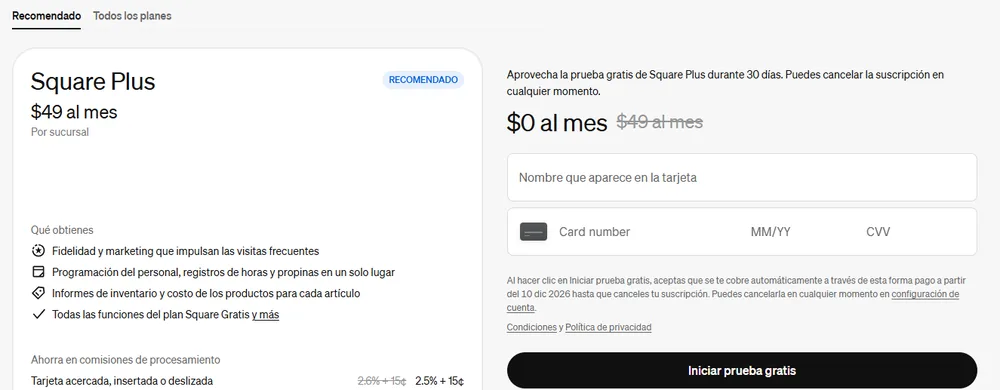
When we signed up, Square recommended Square Plus at $49 a month, with 30 days free. The trial asks for a card and, unless you cancel, starts charging on its own: in our case, on December 10, 2026. The free plan is under the "All plans" tab. We chose Square Free and did not enter a card.
2. The dashboard showed up in English even though we chose Spanish
We set both the business language and the personal language to Spanish, and the dashboard stayed in English. Square's help center explains why: the dashboard follows your web browser's language, not your account's. This is how we fixed it in Microsoft Edge:
- Open Settings › Languages.
- Move Spanish to the top of the list. In Edge, this also changes the browser's own menus.
- Close and reopen the browser, then reload Square.
The dashboard switched to Spanish. Some parts still stay in English, like "Staff & Payroll."
3. To get paid, Square verifies your identity and your bank
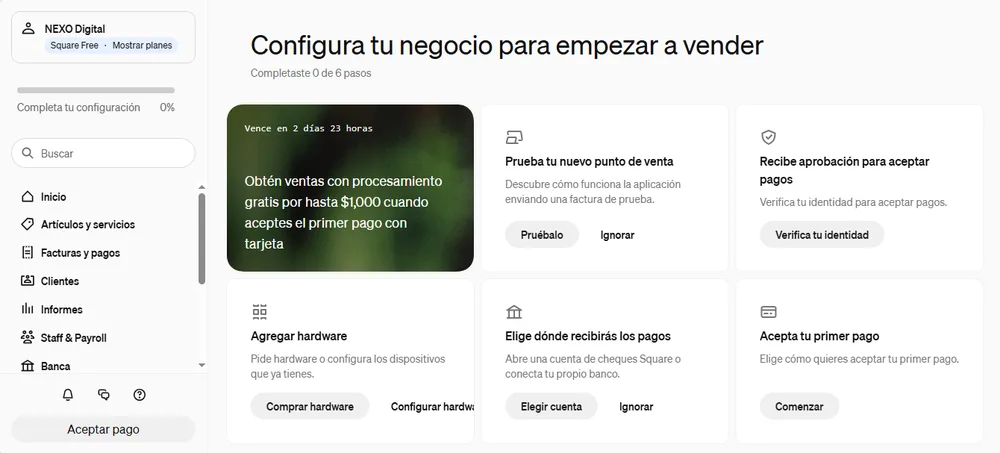
Before you can accept payments, Square asks you to verify your identity and choose where to receive the money. It offers a Square account (Square Checking) or connecting your own bank. We connected NEXO's business account.
Our test payment: a $1 invoice
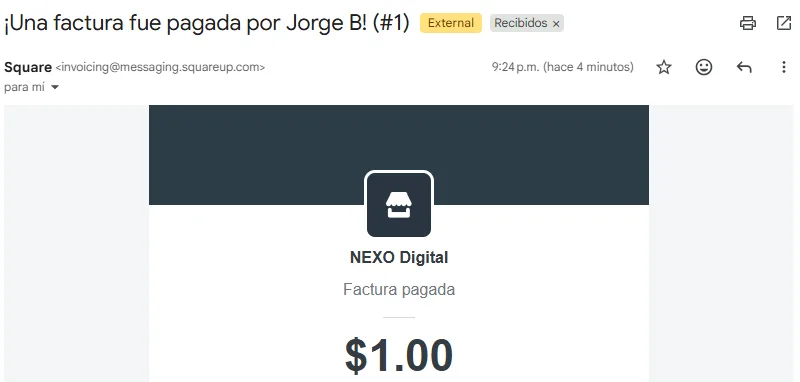
On November 14, 2026, we sent a $1.00 invoice from Square to one of our own email addresses and paid it with a Visa card. This is the result Square shows:
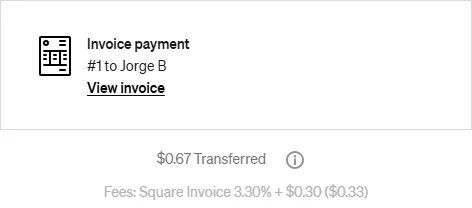
The 30¢ fixed fee weighs a lot on small payments: on $1 it was 33%. On a $500 invoice, the same rate comes to $16.80, about 3.4%.
What caught our attention
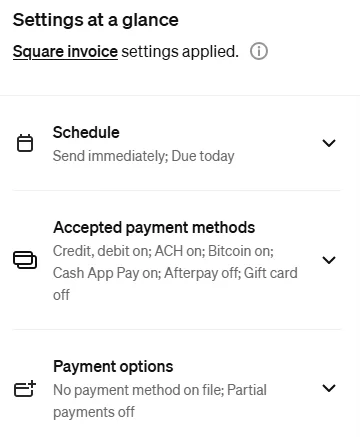
- The invoice comes with many payment methods turned on: credit and debit cards, bank transfer (ACH), Bitcoin, and Cash App Pay. Check which ones you want to accept before you send it.
- Square offers a surcharge option so the customer pays the fee. We did not turn it on: surcharges have rules from the card brands and from some states. Look into them before you use it.
- If the customer doesn't pay, Square schedules a reminder on its own for the next day. It is canceled when the customer pays.
- Our payment notice arrived in Spanish: the email language is set in the location settings.
- The page where your customer pays also shows an ad for Square.
Keep your home address off your invoices
Square puts the address and phone number you gave when you signed up on every invoice. If you work from home, you can change it:
- Go to Settings › Account & settings › My business › Locations and open your location.
- Under Contact information, enter your business phone and email.
- Under Location type, choose "Mobile location." Square still asks for a street: we entered only the street name, without a number, and accepted its warning.
Now the invoice shows only the name, email, and phone, with no address.
Heads up: on that same page, Square offers to put your business on Apple Maps. If your address is your home, think twice before you accept.
Clover: systems by subscription, rate based on your business
Clover sells point-of-sale systems by subscription. Its pricing page says you can "pay as little as 2.3% + 10¢ per transaction" and that the rate depends on your type of business.
Its hardware offer comes with conditions: a 3-year contract, credit approval, and processing $10,000 in the first 4 billing cycles. It also advertises a 90-day software trial (offer through December 31, 2026).
What to get in writing before you sign
- The fee for in-person payments and the fee for keyed-in or online payments.
- The monthly cost of the software and the hardware.
- How long the contract lasts and what it costs to cancel early.
Helcim: no monthly fee and a margin that drops with volume
Helcim uses "interchange plus" pricing: you pay the card cost (the interchange, set by the card brands) plus a fixed Helcim margin. That is why the total fee changes with your customer's card.
Helcim's margin if you process up to $50,000 a month
- In person: card cost + 0.40% + 8¢
- Keyed-in and online: card cost + 0.50% + 25¢
- If you process more, the margin drops automatically. Helcim uses your average over the last 3 months.
Helcim hardware
- Helcim Card Reader: $199. Takes tap and chip, but does not read the magnetic stripe. It has a SIM card for mobile data; the data plan is optional and costs $7 a month.
- Helcim Smart Terminal: $349 plus shipping, or 12 payments of $32.
SumUp: 2.6% + 10¢ in person
SumUp charges 2.6% + 10¢ per in-person payment and 3.5% + 15¢ per online or keyed-in payment. Its free plan has no monthly fee.
- Readers (on sale on November 14, 2026): SumUp Plus at $37 (was $54) and SumUp Terminal at $174 (was $249).
- Take payments on your phone (Tap to Pay): $0 in hardware.
- If you want a full register: POS Plus at $49 a month or SumUp POS from $99 a month, plus the fees.
The same page still shows an old FAQ answer with "2.75%." We used the rate from the pricing table.
Example: a $500 job
We did the math with the published rates, using a U.S. card:
| How you get paid | Fee | You keep |
|---|---|---|
| Square Free, in person | $13.15 | $486.85 |
| Square Free, invoice paid by card | $16.80 | $483.20 |
| Square Free, keyed-in card | $17.65 | $482.35 |
| Square Free, invoice paid by ACH | $5.00 | $495.00 |
| SumUp, in person | $13.10 | $486.90 |
| SumUp, online or keyed in | $17.65 | $482.35 |
With Helcim, in person, the margin would be $2.08 plus the card cost, which changes with the customer's card. With Clover, at the best rate it advertises (2.3% + 10¢), it would be $11.60, but your rate depends on your business.
Before you choose, check this
- How you get paid most often: in person, by invoice, or over the phone.
- Customers with foreign cards: at Square they cost 1.5% extra.
- The hardware: what it costs and whether you need its own mobile data.
- Free trials that ask for a card: write down the day they start charging.
- The rate in writing: if it is not published, ask for it before you sign.
Fees and card sales are part of your business numbers. How to handle them on your taxes is up to your accountant or tax preparer. We are not accountants and this is not accounting or tax advice.
Which one is right for you?
Contractors and remodeling
You send big invoices. With Square Free, an invoice paid by ACH costs 1% ($1 minimum): $5 on a $500 job, versus $16.80 by card. If your customers pay by card online, compare Square's 3.3% + 30¢ with Helcim's margin.
Cleaning and landscaping
You get paid at the customer's home. Square Free lets you start with no monthly fee. With SumUp you can take payments on your phone without buying a reader. Helcim works well if you want a reader with its own mobile data, so you don't depend on the customer's Wi-Fi.
Food: taquerias, food trucks, and stands
You make lots of small sales, and that is where the fixed fee matters. On a $5 sale, Square Free charges 28¢ and SumUp 23¢. That is 5¢ on every in-person sale: with 1,000 sales a month, $50. If you want a full register, get Clover's quote in writing or look at SumUp POS.
Salons and barbershops
Almost everything is in person. Square Free is easy to start with. As you process more each month, compare it with Helcim, because its margin drops automatically with volume.
Would you rather have some help?
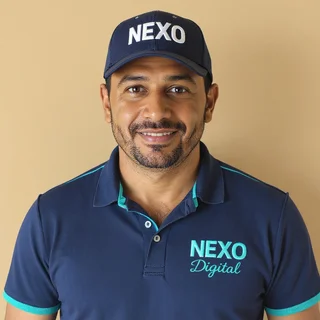
This guide is made by NEXO Digital, a Houston agency that works with Hispanic businesses: websites, bilingual chat, and a receptionist that answers at any hour. If you have questions about getting paid or presenting your business online, write to us and we'll tell you what we would do.
Sources
- Square, pricing by plan: squareup.com · accessed Nov 14, 2026.
- Square Support Center, "What are Square's fees": squareup.com · accessed Nov 14, 2026.
- Square Support Center, plans per location: squareup.com · accessed Nov 14, 2026.
- Square Support Center, account and dashboard language: squareup.com · accessed Nov 10, 2026.
- Clover, pricing: clover.com · accessed Nov 14, 2026.
- Helcim, pricing: helcim.com · interchange plus and volume discounts: helcim.com · accessed Nov 14, 2026.
- Helcim, card reader: helcim.com · Smart Terminal: helcim.com · accessed Nov 14, 2026.
- SumUp US, pricing: sumup.com · accessed Nov 14, 2026.
- Our own experience: NEXO Digital's Square account, opened on Nov 10, 2026, and test payment on Nov 14, 2026. Our own screenshots.